提醒:本文最后更新于 4811 天前,文中所描述的信息可能已发生改变,请仔细核实。
 这个月怎么说呢,上半月是过得不错的,比较顺利。
下半月呢,开始运动什么的(跑步),感觉还行,整理了电脑的音乐;工作忙的要命,N个项目扫尾,都没时间更新什么的。
这还不是最烦的,烦的是乱七八糟小事一起遇上了,挺倒霉的。
比如说,本以为是去某地视察,我难得穿下短裤上班,哪知公司临时变更行程,去了另外一个地方,蚊虫多得要命,被咬惨了。。。
又要写报告了,这几个项目完工报告,头疼。特别是轻轨,交换机出现问题,没头绪啊。很简单的要求,居然不通。没道理,想不通,倒时上班重新排除试试。
难得拆rio carbon换CF卡嘛,居然拆错拆出问题来。。。今天刚(初步)搞定。先凑合用。
从23号开始,一直被D,没日没夜的D,发现只要是工作日,攻击就比较少,周末大把攻击,看来也是天朝上班的人。。。何苦呢,还用了站群服务器攻击我,有必要么?
若我有什么不好的,请你说出来。搞得我忙得要命,还要花点时间,去搞iptables,有必要么,逼急了我只能用redis了。。。又没利益关系,是吧。。。
还有很多,很多倒霉的小事。。。郁闷个去。。。(据说下个月我要更忙更努力)
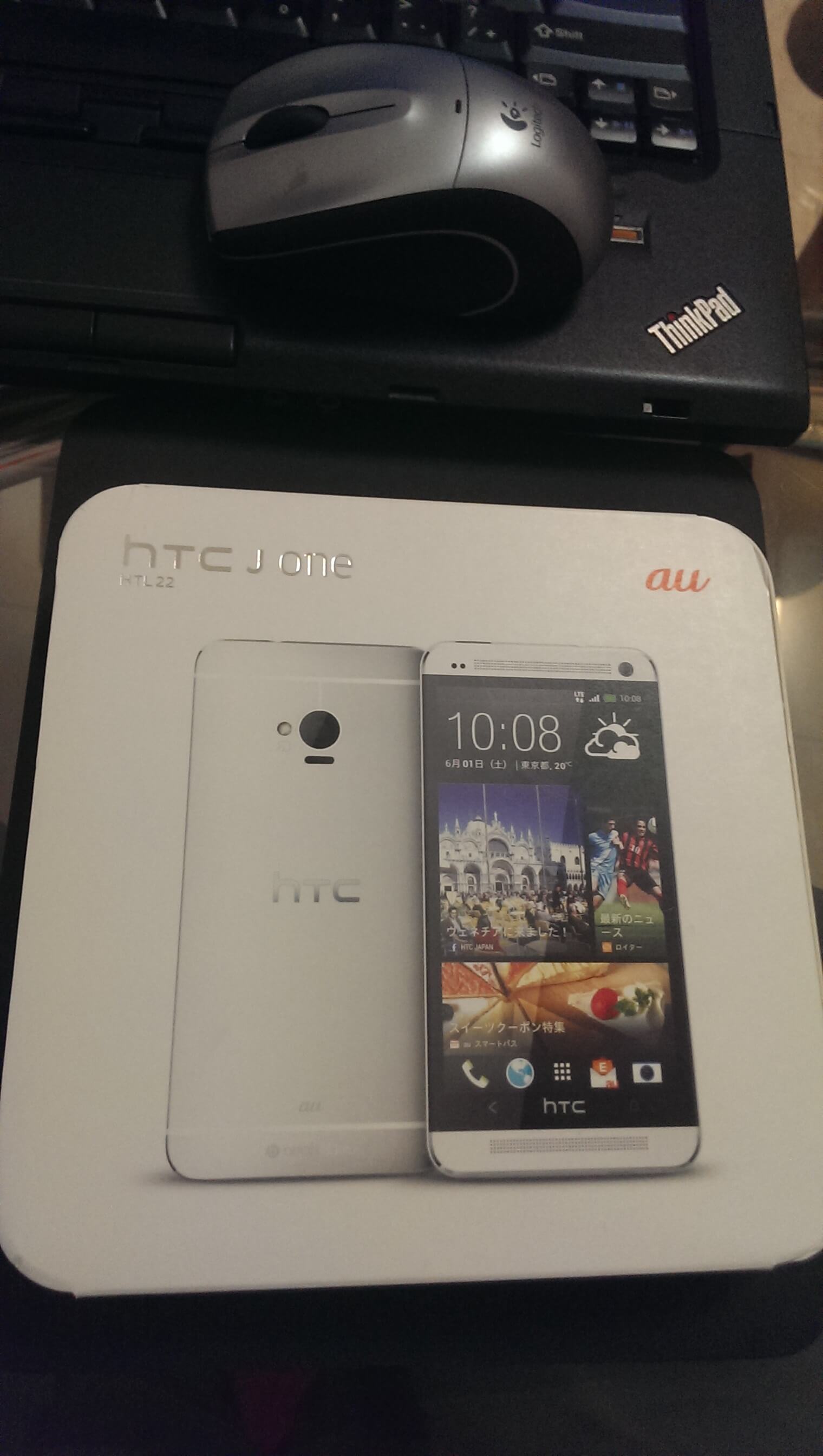
说了这么多不开心的,再来说说开心的,29日,老爸给我买了黑色的HTC J One (m7),日版HTL22(木有钱,加上木有女女秀恩爱,只能秀被关心了。。。),详细介绍不表。
给张外包装图:
转载请注明转自: kn007的个人博客 的《过完最忙碌的月份》

终于可以查看留言了啊 哈哈
@所谓刚子: 哎,不容易啊。接着去忙了。
拜访一下!
@草根成春: 欢迎
对苦逼学生来说最忙碌的月份刚刚开始……
@喂蚊大帝: 好吧...
你应该荣幸,被D的都是大神,小喽喽别人也没兴趣,哈哈。
@小可: 问题是被D瘫痪了
  我又不是cn
@kn007: CN?你不是CN了?
@小可: CN不是之前全被D挂了。。。我也是那几天开始被D的,虽然我有cn域名,不过没用啊...
@kn007: 我以为你说的是那个CN。。。
我换logo了。。。
@小可: 哪个CN?
@kn007: 我以为你被祸害了
@小可: 晕,我懂了 你不能正常思想么。。
@kn007: 我思想很纯洁的
@小可: 。。还纯洁。。
@kn007: 我纯洁的花儿一样
@小可: XX不通...那我怎么算
各种羡慕嫉妒恨,也想换手机想要lumia,不过太穷了~
@Uncle.E: lumia身边人很多人有啊
@kn007: 1020什么的~
@Uncle.E: nokia神器
@kn007: 回复这么快?
@Uncle.E: 额,正好整点东西
日本电信商au KDDI 一如早前所提到,在2013 年5 月20 日发表多款夏季新机;其中HTC J One HTL22、Sony Xperia UL SOL22 与Sharp AQUOS PHONE SERIE SHL22 为高阶机种,Kyocera URBANO L01则是中阶定位。
HTC J One HTL22 与国际版的规格配置略有不同,大小增加为138 x 69 x 10.5mm,重量则是157g;最大的差异是,该手机支援透过microSDXC 记忆卡,将储存空间扩充至64GB,但没有大陆电信商客制款的双卡、双待功能。
其他规格部份,HTC J One HTL22 拥有4.7 吋、1920 x 1080 解析度萤幕(468ppi),采用Qualcomm Snapdragon 600, 1.7GHz(APQ8064T)四核心处理器、2GB RAM / 32GB ROM,并具备独家的HTC UltraPixel Camera 感光元件;软体搭载则Android 4.1 Jelly Bean 作业系统与HTC Sense 5.0 操作介面。
HTC J One HTL22 共有黑、白双色,预计在2013 年6 月上旬推出。
视频介绍地址: http://player.youku.com/player.php/sid/XNTU5NjI4OTA0/v.swf
▲HTC J One HTL22 擁有金屬白與金屬黑兩種顏色款式,採用 Android 4.2 Jelly Bean 作業系統與 HTC Sense 5 操作介面,支援全新「HTC BlinkFeed」頁面,機身正面的設計與國際版無異,但由於加入 microSDXC 記憶卡擴充功能,因此 138 x 69 x 10.5mm 手機尺寸與 157g 重量均略高於國際版本。
▲HTC J One HTL22 採用 408 萬畫素並支援 Zoe 拍照功能的 UltraPixel 相機,鏡頭下方加入紅外線傳輸埠與 Fileca 電子錢包感應點,機身背部最下方則印有 AU 與 Beats Audio 的 Logo。
@kn007: 你说几把啊?
@鬼娃娃: 记录下详细参数。。
@kn007:
1. 執行控制命令---(视窗鍵+R),打入cmd
2. 在命令视窗下输入 cd C:\adb
3. 再打入 adb push revone /data/local/tmp/
4. 再打入 adb shell
5. 再打入 cd /data/local/tmp
6. 再打入 chmod 755 revone
7. 再打入 su(不用UNLOCK+ROOT也能S OFF!! 跳過"su"這個步驟就好了)
8. 再打入 ./revone -P
此時如果视窗回報
revone successful - please reboot to continue.
請手动重启手机后拔掉数据线,电脑关闭DOS窗口,手机重新开机后连接电脑,重开一个DOS窗口,再做一次步驟1~2後
接著
9. 打入 adb shell
10. 再打入 cd /data/local/tmp
11. 再打入 ./revone -s 0 -u
此時如果视窗回報
revone successful.
請重新开机进入bootloader
就会发现你已成功S-OFF了!!!
如果bootloader畫面
最上面的***TAMPERED ***
您看的不是很順眼的話...
一樣在開機狀態下連接電腦後
執行1,2步驟後,依序輸入
10. adb shell
11. cd /data/local/tmp
12. ./revone -t
然後進入bootloader看,就會消失了
介绍一下怎样改为超级CID11111111
1.手机进入HBOOT模式,数据线连接电脑。
2.执行控制命令 (快速鍵:视窗鍵+R) 然後输入cmd
3.在命令视窗下输入 fastboot oem writecid 11111111
如果想刷机后能直接显示国内新闻源的,参照上面改CID的教程第1、2、3步
第3步的命令改成:fastboot oem writecid HTCCN701。
重启手机,这样CID就更改完成了,当然,手机要想显示中国源,还需要重新刷一次机。
@kn007:
What is "EARLY ACCESS PREVIEW"?
We want to give you S-OFF as soon as practically possible so an early access preview release is not a polished product but it does work (mostly). It will:-
* require knowledge of common android tools like adb and/or fastboot
* be a command line tool
* be rough around the edges
* probably crash sometimes
* fail to work everytime or in all cases or on different carrier ROMs - LET US KNOW if you get repeated failure on carrier variants.
* certainly not look pretty.
* despite being "early access" be very unlikely to brick your device (but naturally, this is possible, it's still a hack).
* give you a very good chance of getting S-OFF. Today. Right now.
Status
* revone has been known to grant S-OFF on the latest WWE & EU RUU and Sprint HTC One.
* revone might also work on the Droid DNA 2.04 and 2.06. Awaiting (your) feedback.
Download
* Get the Android SDK for ADB. You may need to update to the latest version of the SDK for jellybean devices.
* Download revone: http://revolutionary.io/revone
Instructions
Use any operating system you like, you only need adb.
1. Download revone (above) and push it to your device: adb push revone /data/local/tmp/
2. Open an adb shell and:
* cd /data/local/tmp
* chmod 755 revone
3. (optional) If your device is unlocked and rooted please switch to root using su.
4. Prepare to gain S-OFF by running the command: ./revone -P
4a. If revone reports success reboot the device and proceed to step 5)
4b. If revone reboots the device (we'll pretend this isn't an undiagnosed random crash) please wait 2 minutes then try again from step 2.
4c. If revone reports that you need to reboot and try again please reboot and try again from step 2.
5. Now that revone has successfully prepared your device for S-OFF please open another adb shell (as per step 2) and change to
the /data/local/tmp directory.
6. Instruct revone to grant you S-OFF and unlock status by running the command: ./revone -s 0 -u -t
6a. Other optional command arguments:-
* -u - Unlock the device
* -l - Lock the device (as if it was never unlocked)
* -r - Relock the device (mark the device as relocked)
* -t - Reset the device's tamper flag.
7. Presuming revone reported success please reboot the device again, this time to the bootloader (adb reboot bootloader)
8. You should now observe your device is S-OFF (and the lock status changed if you invoked that option).
Credits
revone is brought to you by the Revolutionary dev team.
We've been silent, we're back.
Disclaimer
Revolutionary dev team disclaims all responsibility for your use of revone (and any of our tools): If the world ends, it's not our fault. If your device spontaneously ignites, well, that's not our fault either. You make the choice to use our tool, we don't force it upon you.
Support
Please visit #revolutionary on the Freenode IRC network. We will try to support you in the best way possible, but remember, this is early access, and operators might be asleep or not available at the time you join. Just hang around and wait for someone to answer.
差不多了,我科目二下周就考试了,如果过了就不忙了,
@鬼娃娃: 你还没过啊。。
@kn007: 大哥,没时间的人都是我这样啊
@鬼娃娃: 有钱人。。
@kn007: 有钱个毛啊。。。。
@kn007: 哎
htc貌似也不错哦!
@老猫Music: 一直用,手上很多系列的机
穷死了,啥都换不起
@大发: 骚人,谁信你。。
@大发: 没人信的,别说了
周一到周五上班,周末休息D你,这是招谁惹谁了么。。。
@IT三两事: 工作日也D,只是不频繁,好控制,周末智能化,人化。。